Petstore: Pets
The Pets page, served at /console/pets, is the petstore's main table. It lists every pet with server-side
searching, sorting and paging, a ribbon of filters, row actions, multi-row selection with a bulk "Mark sold"
action, and export. It is the best single page to read if you want to see what a server-mode
Rich Table View looks like in a real app.
What this page shows
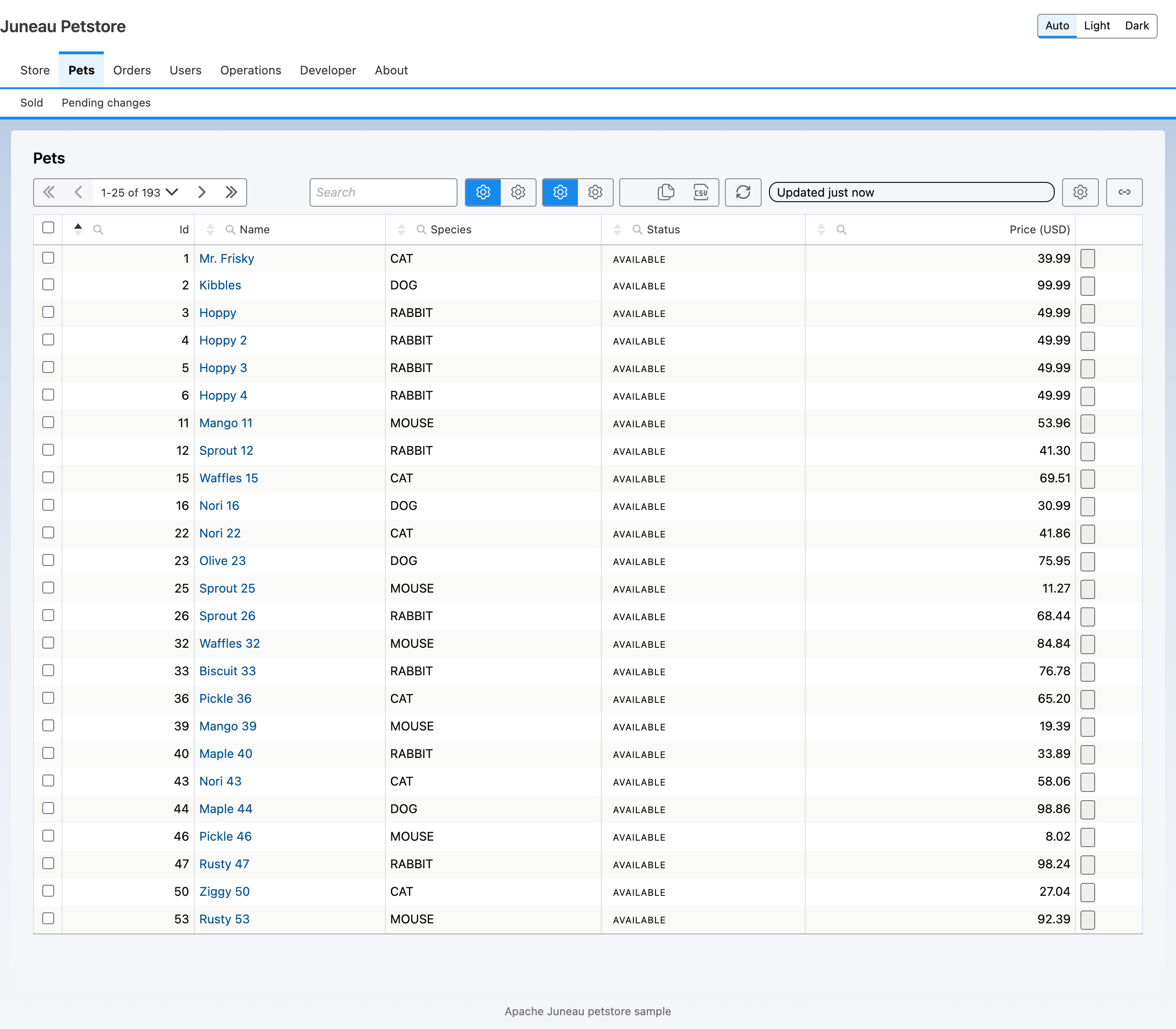
- Server mode. The table posts a DataTables request to
/console/pets/query.PetsRest.queryruns it against the pet collection withDataTablesQuery.run, so searching and ordering are BeanQuery expressions evaluated on the server. A malformed search expression comes back as a 200 response carrying anerrorenvelope, so the table can show the message instead of failing. - Ribbon. Two option groups ("Pet status" with Available and Pending, and "Species" with Mammals and Others) that set column filters, an "+ Add pet" dialog button, copy and CSV export (Excel and PDF when available) and a refresh button.
- Row actions. Edit (a dialog form, merges the row on success) and Delete (with a confirmation).
- Selection and bulk. Rows can be selected across pages, except sold pets, which carry the reason "Already
sold." The bulk action "Mark sold" calls
POST /console/pets/{id}/sellonce per selected row. - URL state. The
idsURL-state directive carries a comma-separated list of pet ids in the page URL. The query endpoint accepts it as?ids=and narrows the rows to those ids before the column filters apply. - Polling. The table refreshes every 30 seconds and pauses while a cell is being edited.
Template
The template is pets.ftlh. The excerpt keeps the data mode, the URL state and the bulk definition.
<@card type="datatables" id="pets" title="Pets">
{
  rowType: 'Pet',
  dataMode: 'server',
  dataUrl: '/console/pets/query',
  urlState: { ids: {} },
  pollIntervalMs: 30000,
  selection: { rowIdField: 'id', selectAll: true, scope: 'persistent', labelField: 'name',
    selectableWhen: [ { field: 'status', op: 'ne', value: 'SOLD', reason: 'Already sold.' } ] },
  bulk: { actions: [
    { id: 'sell', label: 'Mark sold', endpoint: '/console/pets/{id}/sell', method: 'POST', bulkMode: 'perRow',
      confirmTitle: 'Mark pets sold', onSuccess: 'redraw' } ] }
}
</@card>
Builder twin
PetsPageBuilders.pets builds the same table. Selection and bulk are two separate opt-ins; the bulk definition is
created from a WritePermit and the selection it applies to.
var selection = SelectionDef.create("id").selectAll(true).scope(SelectionDef.Scope.PERSISTENT).labelField("name")
    .selectableWhen(RowActionEnabledRule.of("status", Op.NE, "SOLD", "Already sold."));
TableSpec.create("pets").rowType("Pet").dataMode(DataMode.SERVER).dataUrl("/console/pets/query")
    .urlState("ids").pollIntervalMs(30_000)
    .selection(selection)
    .bulk(BulkMutateDef.create(WritePermit.forCapability("pets.sell"), selection).actions(
        RowAction.create("sell").label("Mark sold").endpoint("/console/pets/{id}/sell")
            .method(Method.POST).bulkMode(BulkMode.PER_ROW).onSuccess(OnSuccess.REDRAW)));
The ?mixed variant
Request /console/pets?mixed and the page is "half FTL": pets-mixed.ftlh lays out the page and places the table
with <@card ref="pets"/>, while the table itself comes from PetsPageBuilders.petsMixed(). Both paths share one
petsTable() method, so they cannot drift. Use this shape when you want a hand-written layout around a
builder-defined card. ?builder renders the all-builder page, and ?builder&mixed renders the mixed one through the
builder path.
Per-row and aggregate bulk
The Pets bulk action is in perRow mode: the browser submits N independent single-row requests to the same sell
endpoint, each with its own result. The other mode, aggregate, sends one request listing every selected id
and expects one BulkResult back, with a per-id outcome. The request body is a BulkRequest: the ids, plus an
idempotencyKey so a retried submit never double-applies. The petstore uses the aggregate shape on the Pending
changes page, not here; see Petstore: Pending Changes. Selection and bulk
mutation are introduced in Rich Table Views: Actions.
Source and tests
Source: juneau-petstore/juneau-petstore-core, classes PetsRest and PetsPageBuilders (in the pages package),
and the templates pets.ftlh, pets-mixed.ftlh and fragments/pets.ftlh.
Tests: PetsRest_Test (query paging and counts, ?ids=, sell and its 409 conflict), PetstorePages_ContractTest
(the page contract, including the ids URL state) and PetstoreTwins_Test (template, builder and ?mixed agree).
See also
- Twin pattern: see 19.17. Template and Builder Twins.
- Petstore: Pet Detail: where a pet name links.
- Petstore: Sold Pets: the client-mode counterpart.
- Data Tables: the request and response envelopes, and
DataTablesQuery. - Rich Table Views: Actions: row actions, selection and bulk mutation.
- Data Table View Settings: column configuration and URL state.
- Rich Table Views: the view contract.